
Graphics effects: swaying trees, reflections and rain
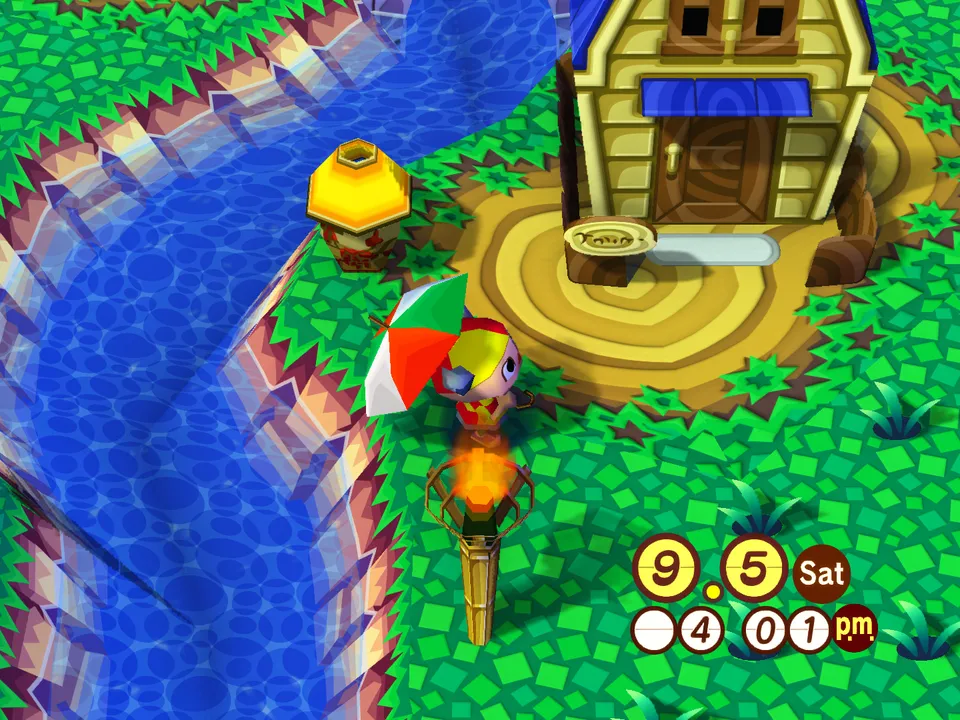
Optional effects for your town, each with its own switch. Turning on any of them except Night lights also brings in a colour look, Vivid unless you change it.
Turn them on
- Open Settings.
- Go to Graphics.
- Switch on Graphics effects to turn them all on at once, then switch off any you do not want. Sky glow stays off until you turn it on. They apply straight away, and stay on next time you play.
The effects
- Night lights: lamps, candles, fires and lit windows light the ground around them, from 6 PM to 5 AM. Indoors they light your room too, at night, and in a basement whenever its light is off. On its own it brings no colour look.
- Swaying plants: trees and flowers move in the wind.
- Sun haze: warm air in the distance at dawn and dusk.
- Sky glow: a glow around the sun, and sky colour on everything. Off to start with.
- Water reflections: rivers and the sea catch the sky and the sun.
- Wet ground: puddles and darker ground in the rain.
- Material depth: surface depth on the ground and buildings.
- God rays: light through the trees, in first person. Computer only.
- Sun shadows: soft shadows at the foot of buildings, trees and weeds. Computer only.
- Colour look: Film, Golden, Misty or Vivid, or Off for none. It is Vivid to start with, once an effect other than Night lights is on. Computer only.
Good to know
- The effects and the PBR material pack are experimental, and performance will be impacted. If you find anything that looks off, please report it on our Discord.
- The effects can make a phone or tablet run slowly and get hot.
- Material depth needs the HD pack and the PBR material pack. The PBR pack is one click, right under the Material depth switch in Settings, Graphics. The HD pack is under Game files.
- The PBR material pack can lower your frame rate, and isn't available on phones and tablets.
- When a new PBR material pack comes out, the game updates yours by itself while you play. The effects update with the game.